This TED Talk was from a while back but i think really interesting and worth a watch
It talks about how web based companies filter information, just take 10 mins out of your day to have a little watch


01884 308091
This TED Talk was from a while back but i think really interesting and worth a watch
It talks about how web based companies filter information, just take 10 mins out of your day to have a little watch
With the new Windows 10 on its way we thought we would share a little bit of our research, by giving you 5 great features that are going to be in Windows 10
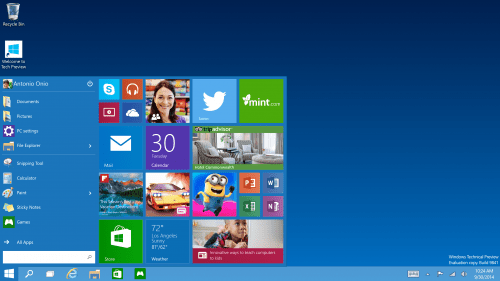
Designed to appeal to experts and novices alike, Microsoft was at pains to point out that it hasn’t given up on touch with the new OS. The Charms bar remains for the moment although we expect it to die if you’re using a non-touch PC (check out Continum below).
Microsoft says it wants to support touch users who have persevered with Windows 8 and “evolve” the touch UI. (Translated: That means it is changing quite a bit.) The task switching will no longer work on the left. So with that and the charms going, that’s goodbye to most of the problem with Windows 8 – and a whole philosophy down the pan.
The wonderful start menu has made a return!
Now the Windows 8 task switcher has been unceremoniously dumped, there’s a new Task View in Windows 10, too, so users can switch between virtual desktops.That’sause Microsoft now recognises that novice users use the taskbar rather than switching in other, cleverer, ways such as Alt+Tab (which also now switches between desktops).
A new Snap Assist feature also helps users work out which way is best to snap apps to. You can snap windows into new screens and tile Windows – just as you’ve been able to since Windows 2.0 or maybe 3.0.
Another quite amazing feature for those of us that use it is that the command prompt is now getting keyboard shortcuts! So you will be able to paste in your commands! Hardly groundbreaking, but actually pretty exciting.
If you want to sell all the things then chances are you’re going to be subject to PCI compliance – it’s important, but initially at least, extremely daunting. But – as new changes loom on the horizon – it’s something that businesses need to get their heads around. And whilst there’s loads more to know about the subject, we’re going to break it down for ya a bit, and get you started with the big new changes you need to know about. They come into effect by 2015 and are considered best practice until they become official; so get ready to get on it like a(n extremely well-secured) car bonnet.
First up, what is PCI compliance?
Payment Card Industry Data Security Standards (PCI DSS) are security standards that organisations have to stick to if they handle cardholder information for major debit, credit, prepaid, e-purse, ATM, and POS cards.
So if you’re dealing with transactions, there’s a good chance you’re going to need to know about this; and even if you already do, it’s important to stay up to date with changes.
What’s the current crack?
We’re moving from version two to version three of PCI Security Standards Council’s (PCI SSC)PCI DSS and PA-DSS; existing PCI DSS 2.0 compliant vendors will have until January 1, 2015 to get up to scratch with these bad boys – new year, new start.
We’ve put together five of the most important considerations here, so you don’t feel like you’re drowning in a sticky PCI-mess of doom; but it’d be a great idea to go and read up on the rest to see what affects you and make sure you don’t fall behind. OK, deep breath – here goes:
Five of the most important changes:
1. Standardising pen test method
We’ve talked about pen testing a little before; but although it’s always been mandatory for PCI where card data is being transmitted, processed and/or stored, now there needs to be a set process for doing it, now you need a set method in place, agreed with pen testing companies, if you want to be all PCI’d up. The method needs to be documented and followed, and must adequately test the control around securing cardholder information.
Initially, this might be a toughie for lots of businesses, as many of them (particularly smaller ones) may not have in-house staff that are able to do it themselves. Therefore it’s important to be extra careful when finding someone to do it for you.
2. Inventorying system components
This one’s all about companies keeping an inventory for pretty much everything – from hardware (virtual or physical hosts and network devices) to software (custom, commercial, off-the-shelf applications); everything has to be documented, describing the function/use for each.
Without automation though, keeping inventories won’t be easy to do, and IT teams will have to spend a lot more time developing and honing ways to create and manage the process. When it’s done though, hopefully it’ll be like having that big, scary spring clean of your house – everything will be a lot easier to find.
3. Vendor Relationships
Businesses will need to provide explicit documentation about which PCI DSS requirements are managed by vendors vs. the organisation itself. For example, if an organisation uses a hosted data centre vendor, the physical access restrictions of that data centre might be managed by the customer organisation. All of this also includes the controls they manage which should help businesses, and businesses should insist on seeing this before using any service provider.
This requirement might prove challenging as it involves analysing exactly how each specific vendor is used. In practice, merchants must now know exactly what the vendor or service provider does, where responsibility should lie for controls, and how to create a document that describes those things.
4. Anti-malware
This next one requires merchants to identify and evaluate evolving malware threats for systems that are considered to be not commonly affected by malicious software; just because it hasn’t been hacked, doesn’t mean it never will be.
So, if you use a system that isn’t usually affected by malware you’ll still need to have a process in place to continue to keep it safe – and should malware rear its ugly head and emerge from those platforms, you need to have an alarm bells red alert warning system in place in order to know about it straight away.
And finally, if you’re still awake…
5. Physical access and point of sale
This one requires merchants to control physical access for on-site personnel, to make sure that it’s based on individual job function and revoked immediately upon termination. Requirement 9.9 states that merchants must “protect devices that capture payment card data… from tampering and substitution” but this seems like it will be a tricky requirement for many retailers to adhere to.
The testing procedures for this requirement specifically refer to verifying that procedures include “maintaining a list of devices”. This new requirement is likely to be a new concept for site administrators or retail location managers and may require a bit of socialisation, preparation and staff training to fully roll it out.
Today we take websites for granted, as users we tend to overlook the work and thought that goes into designing and building websites.
With this in mind i decided to take a look over some old websites from back in the day, to see the evolution of design and functionality. I stumbled upon a really nice article by www.itsnicethat.com which showcase the movie website for the 1996 film Space Jam by Warner Bros
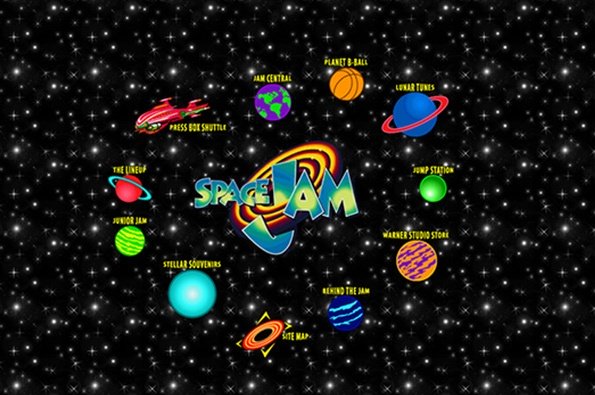
What’s so interesting about the Space Jam website is the staggering difference in it’s aesthetic and the force at which it propels you back to the days when you first saw the internet