Don’t let your bank holiday be a costly one for your business!

We are often asked about email security and what can be done to prevent compromise. You will never be able to get 100% security, simply because the fraudsters pry on individuals to make mistakes by tempting them with emails that appear to be genuine. In many cases, the emails are extremely convincing, and many businesses have lost a great deal of money because of it!

Business email compromise is a type of fraud where either a business email account is hacked or a very similar email address is set up with subtle differences (such as the same company name but with a hyphen or number added), making it difficult to spot.

For example, a fraudster may email your business appearing to be an existing supplier, requesting payment for an invoice to new bank account details. This account will be under the fraudster’s control.

So the do’s and don’ts

  • Never assume that an email received from a known email address (or with a previous email trail) is genuine. Check the email address carefully for discrepancies.
  • Always check requests to pay funds to a new payee or different account details for an existing payee by using a known telephone number. Never verify by replying to the email and do not call the number on the email, this could have been edited by the fraudster.
  • Enable Two Factor Authentication (2FA) – this is where a second verification is required, usually after you have entered your password. It is often in the form of a secure code provided to you by SMS or an authentication app.
  • Never open unexpected file attachments or click links. Make sure you back up your data regularly and store it separately, either offline or in a different location. Also, scan your data backups for malware, as ransomware can be on a network for a period of time before being executed.

In summary, if in doubt ‘Check it Out’!

BeReal – Can I use the newest social media platform to market my brand?

If you’ve not heard of the social media app that’s continuing to rise in popularity, fear not, it’s only really just found its feet – but since then it’s been running.  Be Real is a photograph-based app that offers an authentic alternative to Instagram. The idea is at any time of the day you could be notified to share a snapshot of what you’re doing and a selfie. You only have two minutes to do this, otherwise, you lose the privilege to view your friend’s pictures that only last 24 hours. It’s promoted as a platform that encourages its users to post “real”, honest, and unpolished photos of themselves and their day-to-day life, that only friends can see. Its selling point is that it’s not Instagram – no filters, no picture-perfect photo opportunities, and most importantly no brands and advertising!

However, does this mean that brands won’t use this app as another opportunity for marketing? Truthfully, if a brand was advertising to a younger audience Be Real could be a likely space to do so. Although users of the app might feel that this defeats the object of the new platform, it could still be an effective strategy in marketing your business. Chipotle, a famous Mexican fast-food restaurant based primarily in America, is infamous for having a successful social media strategy. They are the first known brand to use Be Real for marketing, posting promo codes for free food to the first 100 people to view their picture of the day. There are many opportunities for marketing, depending on what your brand is and who your demographic audience is. Think models showing themselves wearing and advertising high-end makeup or teens living out exciting adventures with a particular canned drink always in shot.

There are plenty of opportunities for marketing using Be Real – food for thought if you’re thinking of innovative ways to market your brand. However,  for now your bigger social media platforms will most likely be more effective.

For any other advice on social media management for your company message daisy@function28.co.uk

The Rise of the Reel

We already know how effective Instagram can be used to market your business if you don’t – it’s worth checking out a previous blog post of ours “How to… Instagram for business” for some excellent tips and advice. However, you may notice with the updated version of the app, Instagram is featuring a lot more short-form video content on our feeds – so much so that they have almost taken over from pictures! We, of course, have TikTok and its popularity and success to thank for this! If you use Instagram to promote your business, jumping on the hype of creating these 15-90 second videos can be vital in attracting people to your business page. So here are some top tips on how to use reels as a valuable marketing approach.

1.  Choose what sort of reel you want to create

Choose whether you want to provide an informative video about your business or a funny video that might not totally relate to your business – but will attract views and interaction! Reels are meant to be entertaining and engaging so it’s important to not take these too seriously and have fun with them.  Informative reels I’ve watched myself, include lots of before and after’s or videos showing the process of how they do something; for example, “pack an order with me” or “shoe this horse with me!” I have even been known to spend hours watching somebody pressure washing driveways! Users find these satisfying to watch and it educates them on the process of what goes into your business, therefore making it personal and relatable. This doesn’t mean your reels always have to be work-related, like I said – have fun!

2.  Add transitions and music to your videos!

Adding music and transitions is important to make your video fun and entertaining! With reels ever-growing in popularity, Instagram has made reel tools and features more accessible and easier to use, so navigating your way around the app shouldn’t prove too tricky! It’s important to try and match the music and transitions up, as ensuring your video is in sync will look more professional.

3.  What’s trending?

Usually, there is a popular trend or sound circulating at the time. By jumping on the bandwagon and using the sound or creating content that is trending virally, you will optimise your exposure and ultimately get more reel views. Even if it means partaking in a silly challenge, this will more likely end up on the feed! So, get researching – just be aware that reels are addictive, so cancel any plans for the next couple of hours!

How To… Run an Ad on Facebook

Facebook

Have you noticed that your newsfeed on Facebook is almost always full of paid ads by companies? Well, there’s a reason for that!

Because of changes to Facebook’s algorithms throughout the last few years, businesses found that their organic reach declined. Companies were sending out the same content but basically just shouting out into the wilderness. Savvy businesses soon sussed out that paying for ads on this platform gets them the reach they want.

If you have never run an ad on Facebook before, or perhaps it didn’t work for you the first time round, this is the blog for you. Let’s get into this…
1. Get Targeting

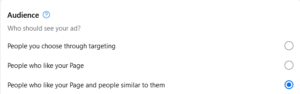
There are almost 3 billion Facebook users who use the platform daily. That’s a lot of people, but you’re obviously not going to reach all of them! I personally find Facebook’s ad creation really straightforward. The platform allows you to really hone in on who precisely you want to target. Here are some of the ways you can target your ads on Facebook:

– Location – local, or further afield, you’ll be given the option
– Custom Audience – you can specify age, interests, location, key words, education. Targetting people in the local area, people who like your page and similar to them. The possibilities are endless.

2. What do you want your ad to achieve?

It’s vitally important that you have in your mind what you want your ad to achieve. Would you like more visitors to your website, more messages, calls, page likes, leads? You can select your goal when setting up your ad. Alternatively, Facebook can select a goal for you automatically.

Taking a picture for Facebook3. Looking Good

Having great images on your ad will help big time. Facebook will automatically select the last few pictures that you’ve taken, but you can choose which ones you’d like to have displayed. It’s a great way of really showing off what you have to offer so choose wisely (you can have up to 5 images).

If you don’t want to go down the picture route, then choose a video. Customers are 1.81 x more likely to make a purchase after viewing a video compared to an image ad. There isn’t really a time limit of how long your video should be (you can use the full 240 minutes, but I wouldn’t advise it!). Videos in ads that are up to 30 seconds long will get you the best result.

Take a look at some of these great Facebook Ads here for inspiration.

Top Tip: Bit stuck on how to make a video? Try Canva for free. I’m in this app pretty much my whole working day. There are so many templates and videos you can choose in here, it will truly revolutionise your social media pages.

4. How long and how much?

Schedule a start date and time, and when you’d like to ad to finish.

As to when is the best time to get the ad out there, it varies. It all depends if you’re B2B or B2C. If you’re targetting the former, run your ads during the week, the latter, during Friday’s and the weekend. Most people are on Facebook at midday, so start your ad then.

The Daily Budget for your Facebook ad depends on how many people you’re looking to target (and of course what your business has set aside for social media). The higher the budget, the more people you’ll reach.

Once you’ve done all of the above, hit that Promote Now button!

5. The Do’s and Don’ts

There are the do’s and don’ts when it comes to creating an ad for Facebook.

– Don’t write lots of text – this will definitely switch people off
– Don’t be deceptive – not only will this annoy customers, it could get you banned from the platform
– Do proof read before you hit that promote button – check that spelling!
– Know your audience – this is key. This will help you target the right people, and also set the ‘voice’ to the ad.
– A clear call-to-action – Facebook will ask what button you want to go onto your ad (i.e. Get Messages, Call Now, Find Out More, etc.) but also put this in your text.
Facebook Insights6. How did it measure up?

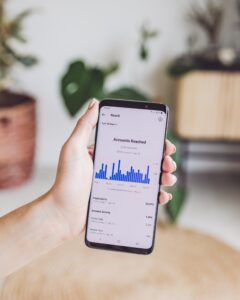
To find out how successful your ad was, focus on the following metrics under Insights:

– Actions
– Cost per Action
– Spend
– Frequency
– Revenue

Don’t focus on these “vanity” metrics:

– Click Through Rate (CTR)
– Clicks
– Cost per 1,000 impressions
– Reach
– Impressions

Whilst these figures look great, Actions and Revenue is showing you exactly what you’ve made from the ad.

There you have it, some tips on getting a succesful ad on Facebook!

To keep up to all the latest news at Function28 and best practice tips, take a look at our blogs or find us on social media.