How to make sure your Business’ Twitter Account is found by Google

Are you aiming to achieve more exposure for your Business’ Twitter account? When was the last time you checked what you had written in your bio? Did you know that in 2015 Twitter made an agreement with Google, officially giving Google full access to Twitter’s full stream of tweets, making Twitter’s 140-character tweets more searchable online? Read Function28’s tips and tricks to optimising your Twitter Account for search engines.

  • Keywords

Keywords that you’re already using in the metadata (the page content) of your Business’ website are a good place to start when optimising your Twitter Account. Your website keywords might not translate seamlessly to Twitter, but if you combine them with popular hashtags and topics that work well with your content, you’ll have a good bunch to start with. These keywords and Hashtags improve your search-ability and help people find your content, ensure that you only use them for keywords and terms relating to your business as otherwise your content and updates may look spammy and discourage potential followers. These keywords will be picked up by Google due to the 140 characters being searchable online, allowing you to make your business more exposed in search engine results.

  • Hashtags

‘Hashtagging’ differs from using keywords as hashtags are a more immediate and sometimes short term promotion method, for example, if you’re running a campaign for your business, using hashtags alongside keywords would work better than just keywords alone. Hashtags drive engagement on social networks and increase traffic to your website via click-throughs on the link included in the social post where the hashtag was used. Getting your hashtag trending on twitter would be massively beneficial to your business as Twitter has 313million monthly active users! Give it a go, let us know you’ve read this post by using the hashtag #Function28Optimisation, we’ll see how many people read it!

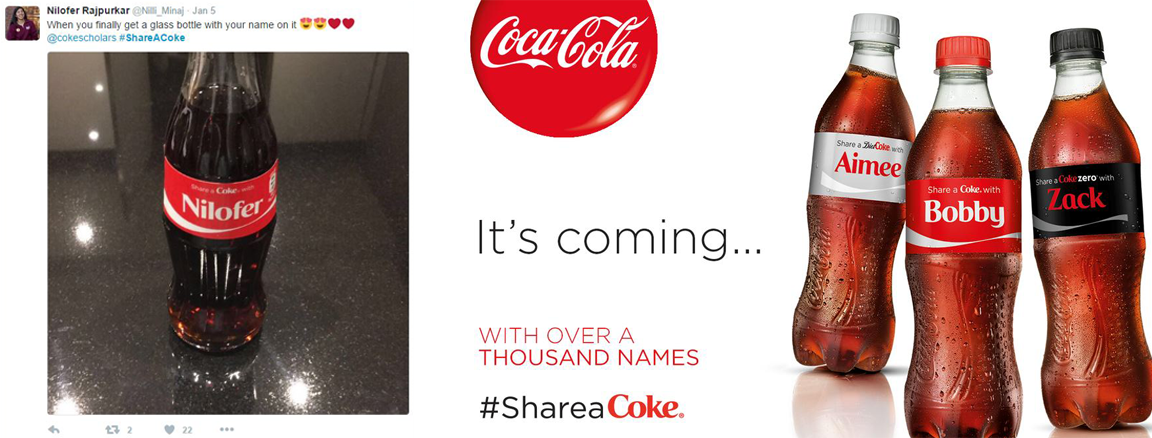
A great example of a hashtag campaign is Coca-Cola’s ‘#share a coke’ campaign. The campaign was released when they brought out their named bottles. The campaign was so successful that the hashtag is still being used now.
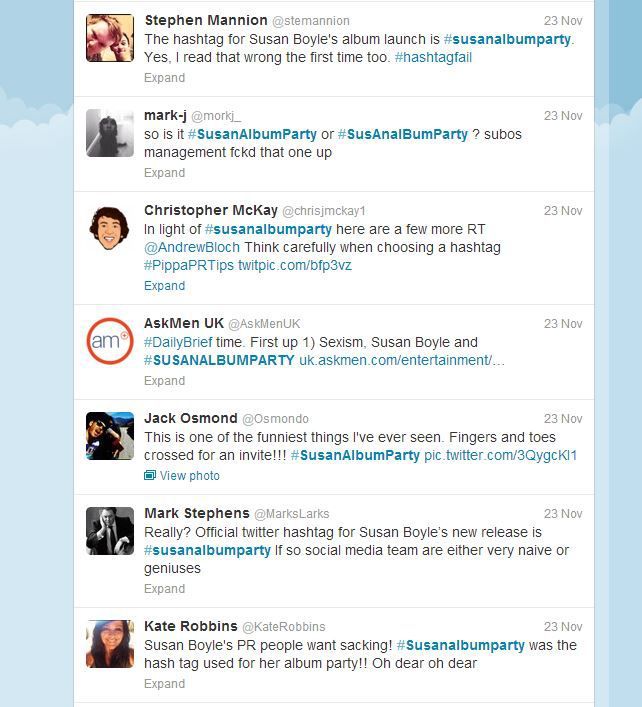
Hashtags can cause issues when trying to create campaigns for your business as they can be ‘hijacked.’ Hashtag hijacking is when an existing hashtag, that a company has set up to generate positive PR, is hijacked by others. Instead of being used for positive sentiment, it is used for attacks on the business, or for sarcastic and negative comments. Sometimes the hashtag is mocked and made into something it wasn’t intended for, such as the Susan Boyle Album release example below, however, in regards to this example, it actually made the album more talked about and was, therefore, a successful campaign despite the misleading hashtag.
  • Profile Optimisation.

Optimising your Twitter profile will increase your businesses exposure and provide you with long-term search-ability. Ensure to keep your username and handle consistently across all of your social media accounts, using your brand name and website links increase your findability. See our article on Facebook Optimisation to ensure all your social media accounts are optimised! Fill out all of the sections and ensure they are as detailed and accurate as they can be, this will increase the validity of your account.
When uploading your Twitter photo, name your image with a relevant title such as ‘Function28-devon-webdesign’ as the name of your images are also read by search engines.

Verification badges- A blue “Verified” badge that appears on certain Twitter profiles. The badge helps Twitter users get true, verified information directly from public figures and business entities. Apply for a twitter verification badge here. Ensure you check that your account is ready before applying for the badge.

  • Bio Optimisation

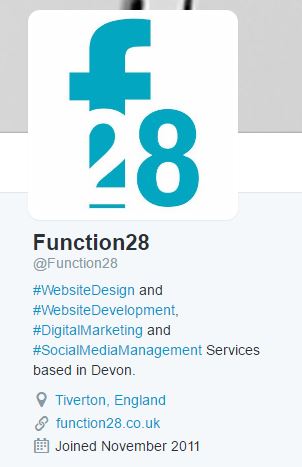
Twitter’s bio is indexed regularly. Craft it well, use up all of the 160 characters to explain what tweets your followers may expect from your profile. Aim for simplicity and be concise. Emphasise the most important aspects of your expertise and remember to promote them in a catchy & creative way. Consider using Twitter’s language like #hashtags and @mentions which play the role of clickable keywords in your bio section. It’s your golden opportunity to link to your official website and make significant improvements to your account’s findability. Check out the photo to the right to see how Function28 do this.

Including a link to your official website is a strong call to action. Consider which page would be most appropriate and where you want to send your followers. There are plenty of options, however, by SEO standards, most authority usually belongs to the main page of your company’s website, so this is going to be the most reasonable choice. In the case of any temporary campaign or event, you can always link to a special landing page.

Make sure that your website also links back to the Twitter account. Mutual linking not only brings more valuable traffic but also gives your profile more credibility in the eyes of Google.

We offer social media packages that include the set up and optimisation of you Social Media Acocunts.  If you have any enquires about how to optimise your social media accounts, call Function28 on 01884 308091 / 01472 485858. Make sure you follow our social media accounts to see more of our tips and tricks!

How to make sure your Facebook Business Page is found by Google

making sure your Facebook Business Page is found by Google, facebook optimisation
Facebook Pages have proven to be very beneficial to smaller businesses over recent years, with Facebook creating many updates and new features to its platform that now allow you to run your whole business through a Facebook Page. This means that a Facebook Business Page has become a ‘second home page’ for many small businesses. However, do you know how to actually ensure your Facebook Business Page gets found? It’s important to optimise your Facebook Business Page with some SEO best practices.

  • Name.

These best practices begin with choosing the right name for your Business Page. This is the most important element as you chose this name once, and it is then permanent after this. Your Business Page name should be brand-able and represent your business and show its personality. It’s key to remember that the first word of your Facebook Page title is the most significant in the eyes of Google.

  • URL.

Once you’ve created a page name, Facebook automates you a URL, we recommend that you don’t keep this automated URL and instead, personalise your URL address, unify it to go with your brand name instead. Make it unique and easy to remember. If you match your Facebook URL with the page title you’ll strengthen your brand identity and even more importantly, personalisation will hugely improve the findability of your page both in Facebook search and in search engines. For example – ‘https://www.facebook.com/function28/‘ or ‘https://www.facebook.com/BBCSouthToday/.’

  • Fill out your profile.

The next steps require you to fill out your profile fully, uploading images to be your page profile pictures and cover photo and then adding up to date relevant information about your business to the page. Pay special attention to the ‘About us’ section, as your visitors want to know all of the details about your business, they’ll look for opening times, phone number, a bio, location, your services, prices etc. Similar to Meta Description, you need a suitable description, short enough to be correctly displayed in the search engine snippet, both on desktop and mobile (you get 155 characters.)
A complete profile shows your audience that you have a professional attitude and are engaged in what you do. As well as applying this to your Facebook Business Page, aim for consistency across all of your social media accounts, and make sure that the main graphics match. Utilise your Facebook cover photo as its 851 x 315 px and therefore the largest image you get to play with on your profile, it’s also one of the first things your audience will see when making a first impression of your business. Take a look at this template which shows you areas that aren’t available on mobile.

  • Additional features.

Once you’ve ensured that your content it filled out fully with the relevant images, it’s time to optimise the newest features that Facebook has in place for Business Pages. These include, ‘Call to action’ button, messenger for business and instant replies. Using these features certify that your page is well optimised and increases the authenticity of your page on Google.

  • Optimising for keywords.

Throughout setting up your business page, optimising for keywords remains crucial, even when it comes to social media. Place your targeted words and phrases in the most important, strategic parts of your page, include them in the URL, page title and ‘About us’ section because they will then be visible on the front page and will appear in search results.

Remember that the name of your page corresponds with the title tag and your short description works as the Meta Description Tag. However, make sure that you do not overuse keywords, stick to a top six and mention them naturally in their proper context.

  • Populating!

Finally, once your business page is set up it’s time to begin populating it. Regular posts and interactions on Facebook will keep your business talked about and increase the optimisation for it to appear in Google.
It’s helpful to note that the first 18 characters of each of your Facebook posts serve as the Meta Title and the Meta Description in search engine results page. Therefore, any time you are posting on Facebook, uploading a picture or creating an album etc., take advantage of the fact that you can add a description and make sure that any post has keywords and phrases relating to the business.


If you need any help in setting up a Facebook Business Page, or have any questions, please get in touch with us on socialmedia@function28.co.uk or call 01884 308091 / 01472 485858.


Source: https://positionly.com/blog/social-media/facebook-business-page

5 Steps Small Businesses must take to protect themselves in 2017

Throughout 2016 we’ve seen a shift in media attention towards cyber security. Data breaches and hacking are now headline news. This year has seen accusations of hacking in the US election, Yahoo admitting to two colossal data breaches with lost user records numbering in the billions, and hacks on small businesses rising dramatically, with SMEs increasingly targeted by ransomware attacks.

The internet of things offers new opportunities to attackers as the network of connected devices grows. These devices – kettles, fridges, baby monitors, etc. – are often not as tightly secured as our PCs, phones and laptops. The threat to small businesses is huge, with reputations on the line and heavier fines to be dished out for those who fail to protect data to an adequate level. Small businesses without dedicated IT staff must take steps to protect the personal data they hold, whether that’s customer data or the personal information of their employees.

Lawrence Jones, CEO of cloud and dedicated hosting firm UKFast and cyber security consultancy Secarma, offers his five key steps for small business owners to take in order to stay safe in the evolving digital landscape as we enter the New Year.

(source https://www.ukfast.co.uk)


1) Use a password manager

Remembering strong passwords for all the applications you use in your business and personal life is all-but-impossible and many people end up either using weak passwords or re-using them. Instead, use a password manager. There are many around, such as LastPass and KeePass. Be aware that some password managers have had security breaches, so be sure that yours up-to-date.


2) Check your backups

One of the most damaging attacks, and one of the most frequently deployed against small businesses, is Ransomware. This malicious software encrypts your critical business files; locking you out and demanding payment for release. Imagine the damage that could do to a business! The frequency of this kind of attack has exploded in the last 12 months because criminals are getting results. Now’s the time to fight back. Ensure you keep regular backups in a separate location, so that if you’re held to ransom you can recover your critical files without having to pay the attackers.


3) Beware Internet of Things devices

Many Internet of Things (IoT) devices have been the weak link which led to a security breach, putting your home network at risk. Like any software, you need to keep IoT devices up-to-date.
Think carefully before setting up a “port forward” to allow you to login to devices remotely – if you have a weak password or a vulnerable device, hackers will be able to access it too, and if it’s connected to devices you use for work you’ll be leaving your business exposed too.


4) Educate your team

It’s difficult to change human behaviour and break bad habits, so it’s important to get your team together in a group to discuss the risks and how to avoid them. Show them examples of ransomware attacks and other phishing emails, and give them the stats about what falling for these scams costs individuals and businesses every year. Provide examples of how individual employees have caused irreparable damage to businesses. It may seem farfetched, but it’s important they see just how crucial it is to be aware of the dangers. Ultimately, we’re all responsible.


5) Use an ad blocker

Many viruses are spread through malicious adverts. Using an ad blocker is simple and quick in helping you to reduce your exposure and keep your business safe from these viruses. AdBlock Plus (ABP) is among the most popular ad blockers, with versions available for Firefox, Chrome, Opera and a new version just released for Internet Explorer.