
How To… Run an Ad on Facebook

Facebook

Have you noticed that your newsfeed on Facebook is almost always full of paid ads by companies? Well, there’s a reason for that!

Because of changes to Facebook’s algorithms throughout the last few years, businesses found that their organic reach declined. Companies were sending out the same content but basically just shouting out into the wilderness. Savvy businesses soon sussed out that paying for ads on this platform gets them the reach they want.

If you have never run an ad on Facebook before, or perhaps it didn’t work for you the first time round, this is the blog for you. Let’s get into this…
1. Get Targeting

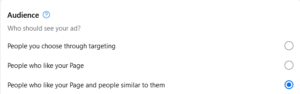
There are almost 3 billion Facebook users who use the platform daily. That’s a lot of people, but you’re obviously not going to reach all of them! I personally find Facebook’s ad creation really straightforward. The platform allows you to really hone in on who precisely you want to target. Here are some of the ways you can target your ads on Facebook:

– Location – local, or further afield, you’ll be given the option
– Custom Audience – you can specify age, interests, location, key words, education. Targetting people in the local area, people who like your page and similar to them. The possibilities are endless.

2. What do you want your ad to achieve?

It’s vitally important that you have in your mind what you want your ad to achieve. Would you like more visitors to your website, more messages, calls, page likes, leads? You can select your goal when setting up your ad. Alternatively, Facebook can select a goal for you automatically.

Taking a picture for Facebook3. Looking Good

Having great images on your ad will help big time. Facebook will automatically select the last few pictures that you’ve taken, but you can choose which ones you’d like to have displayed. It’s a great way of really showing off what you have to offer so choose wisely (you can have up to 5 images).

If you don’t want to go down the picture route, then choose a video. Customers are 1.81 x more likely to make a purchase after viewing a video compared to an image ad. There isn’t really a time limit of how long your video should be (you can use the full 240 minutes, but I wouldn’t advise it!). Videos in ads that are up to 30 seconds long will get you the best result.

Take a look at some of these great Facebook Ads here for inspiration.

Top Tip: Bit stuck on how to make a video? Try Canva for free. I’m in this app pretty much my whole working day. There are so many templates and videos you can choose in here, it will truly revolutionise your social media pages.

4. How long and how much?

Schedule a start date and time, and when you’d like to ad to finish.

As to when is the best time to get the ad out there, it varies. It all depends if you’re B2B or B2C. If you’re targetting the former, run your ads during the week, the latter, during Friday’s and the weekend. Most people are on Facebook at midday, so start your ad then.

The Daily Budget for your Facebook ad depends on how many people you’re looking to target (and of course what your business has set aside for social media). The higher the budget, the more people you’ll reach.

Once you’ve done all of the above, hit that Promote Now button!

5. The Do’s and Don’ts

There are the do’s and don’ts when it comes to creating an ad for Facebook.

– Don’t write lots of text – this will definitely switch people off
– Don’t be deceptive – not only will this annoy customers, it could get you banned from the platform
– Do proof read before you hit that promote button – check that spelling!
– Know your audience – this is key. This will help you target the right people, and also set the ‘voice’ to the ad.
– A clear call-to-action – Facebook will ask what button you want to go onto your ad (i.e. Get Messages, Call Now, Find Out More, etc.) but also put this in your text.

Facebook Insights6. How did it measure up?

To find out how successful your ad was, focus on the following metrics under Insights:

– Actions
– Cost per Action
– Spend
– Frequency
– Revenue

Don’t focus on these “vanity” metrics:

– Click Through Rate (CTR)
– Clicks
– Cost per 1,000 impressions
– Reach
– Impressions

Whilst these figures look great, Actions and Revenue is showing you exactly what you’ve made from the ad.

There you have it, some tips on getting a succesful ad on Facebook!

To keep up to all the latest news at Function28 and best practice tips, take a look at our blogs or find us on social media.




#OverIt – is the hashtag dead?

Hashtags first came into prominence 15 years ago with businesses finding them a great way to organise content and reach more people.

However, in the last few years, spam and bot accounts have hijacked hashtags, adding them to their posts that have no relevance to the subject, meaning anyone searching for that hashtag has numerous posts displayed in front of them that don’t make any sense.

A number of marketers believe that hashtags just don’t have the power they once had. Recently, even the Head of Instagram said they are pretty much a waste of time.

This begs the question, is the hashtag dead?

Many marketers still advocate the use of hashtags, as they have proof directly from the analytics showing they result in engagement.

Here at Function28, we don’t believe the hashtag is dead, you just need to use them wisely. Let’s get into this…

How many is too many?

Instagram has a 30 hashtag limit. You can by all means use all 30, but after 10 or so, they get diluted and too far away from the actual content.  Our advice is to use 7-10, this way you stay on subject.

Do your research

Before you post, find out what hashtags are used commonly within your industry. There are fancy-pants paid for sites (such as this one) that can help you with this, but all it takes is a little bit of your time. Search within Instagram keywords for your industry, e.g. #SocialMediaMarketing, and see how many posts there are with that hashtag. The rule is, if the hashtag has over 1m posts, stay away from using that one. Your post will only get lost in that feed and bring you very little in the way of followers or engagement.

Monitor what the competition is doing. What hashtags do they use? What posts worked best for them?


Keep it relevant

Whatever hashtags you do use, keep them relevant to the content you’re posting. There are some rules that you should always have in mind when you’re using hashtags:-

Description – for example, for a post advertising web design, use the hashtag, #webdesign

Location – if you’re posting about an event, maybe where you’re based, put in the location

Keep it short – too many words make it harder for people to read, and the likelihood of it being a popular one in the first place is very low.


Show your support

You’ll see many companies using hashtags as a way of promoting/supporting social issues, for example #IWD2022 was widely used amongst a variety of companies back in March for International Women’s Day. If there is a way of linking a trending social issue’s hashtag for your company and you want to show support, then this is a good way of getting you in front of a wider audience.

Is the hashtag dead? Nope! Keep using them but wisely, and you’ll see your engagement grow!

Want to keep up to date with all the latest marketing and social media advice? Follow us on Facebook, Twitter, Instagram, and LinkedIn.

Read our other blogs here.


Is TikTok damaging its own USP?

It was announced a few days ago that TikTok will be increasing its video length to a whopping 10 minutes long. Over the past few years, the platform has been steadily increasing the length of videos, with the maximum of 3 minutes being rolled out last July. Is TikTok damaging its own USP by doing this?

What does TikTok say?

A TikTok spokesperson said in an interview, “We’re always thinking about new ways to bring value to our community and enrich the TikTok experience. Last year, we introduced longer videos, giving our community more time to create and be entertained on TikTok. Today, we’re excited to start rolling out the ability to upload videos that are up to 10 minutes, which we hope would unleash even more creative possibilities for our creators around the world.”

History

TikTok started back in 2018, and thanks to the pandemic, hit stratospheric levels with the amount of times the app was downloaded (it hit a total of 2 BILLION downloads in 2020!). People saw it as a boredom buster, and funny videos took their minds off being stuck indoors. The platform’s USP was its plithy, and short videos which have struck chord with many, leading some to become huge stars off the back of the app.

Imitation is the best form of flattery

So many other platforms have tried to copy TikTok’s success by introducing their own short video option, i.e. Reels on Facebook and Instagram, Shorts on YouTube. If others are copying you, surely you should be secure in the knowledge that you’ve invented a really cool thing?!

F28’s opinion

We’re not entirely sure why TikTok has made this decision. We think they want their users to stay on the platform longer and perhaps feel under pressure from its direct competition, YouTube who have always preferred longer content.

In our opinion, this move will narrow the difference between TikTok and YouTube. With attention spans getting shorter and shorter, even a 5 minute video runs the risk of losing your attention. A 10 minute video will get less engagement than that of a standard 15 second TikTok. Extending the video length may well switch off big creators on the platform, and therefore, could hurt it financially.

It feels like we’ve been here before though. Way back in 2017 with Twitter changing their character limit from 140 to 280, there was a huge uproar at the time but the platform doesn’t seem to have changed significantly as people had thought it would.

If the app did go under because of this decision, it would be a big shame. Whilst some might not ‘get’ TikTok, it has undoubtedly changed the way many businesses around the world connect with, and market to their followers. You can see the huge cultural impact it’s had everwhere you look.

Let’s see how this pans out!

If you have any questions about your social media marketing, please contact Gemma on 01884 308091.

Check out our other blogs here.