5 Ways to make sure Visitors stay longer on your website

Are you looking for ways to keep visitors on your website for longer?  If you are getting high bounce rates you need to make your website more engaging.

He are some helpful tips we have put together

  1. Avoid Excessive Advertising
    There’s nothing wrong with a little advertising on your site, whether that’s in the form of branded callouts or banner ads for affiliates, but there’s a point where it becomes a problem. Obnoxious, flashing advertising repetitive pop-up ads can be annoying, especially to repeat visitors.
  2. Fix Your Navigation
    Your navigation is a roadmap that tells your users where to go and what they can find. If any part of your navigation is inaccurate or non-intuitive, your users aren’t going to find what they’re looking for. Keep your navigation clean, with the initial heading containing only broad categories, and keep your page distinctions concise
  3. Make Your Text More Readable
    Text that’s difficult to read is an instant turn-off for almost any visitor. Fortunately, there are many ways to optimize your text for readability. First and foremost, make sure you have a color that shows up legibly on any device—and that includes both the color of the text and the color of your background.  Remember, that goes for both headlines and body copy.
  4. Optimise for Mobile
    This goes without saying in 2015, but your site needs to be optimized for mobile devices. If your site isn’t easy to use on a smartphone or a tablet, you’re going to lose out on a massive share of users. Plus, non-mobile-optimized sites get a ranking penalty from Google.
  5. Never Send Your Users Away
    This is a basic rule for web development, but you would be surprised how often it is neglected even in the modern age. Never send your users away from your site with external links. It’s perfectly fine—and valuable, in some cases—to link to external sources, but make sure all those links open in new tabs or new windows.

eBay will “hide” listing descriptions for sellers with HTTP content in their listings

eBay will be enforcing a new links policy update. Read our summary on the update to make sure your eBay business isn’t affected.


Why is eBay changing it’s links policy?


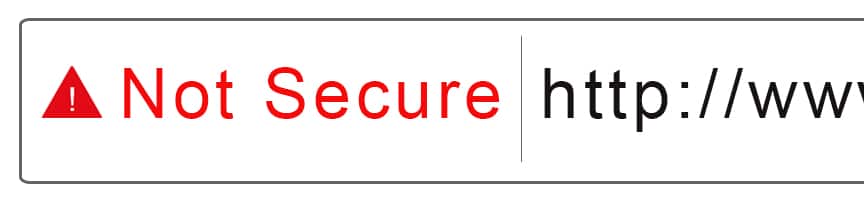
If you’ve read our articles and received our emails about changing from HTTP to HTTPS to secure your website, then you’ll be aware that, as of last month (October 2017), Google started marking HTTP Websites as ‘not secure’ if they didn’t have SSL Certificates. (If you haven’t, where have you been!? You can read them here.)
eBay has now made changes to their policy to match up with Google’s ‘not secure’ feature. eBay states that the changes are “to ensure that buyers don’t see this [not secure] message when they visit your listings, eBay is changing how desktop users can view listings with non compliant content.” The update will:

  • Increase the security of the marketplace.
  • Increase conversions of visitors to customers.
  • Make sure that eBay sellers pay eBay its final fees instead of completing transactions on external sites.

How will eBay change its listings?


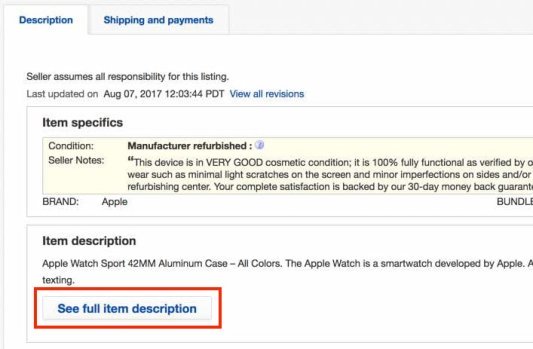
“The majority of eBay listings are already secure and will be unchanged.” However, listings with not secure HTTP links will feature key bits of information from the item description followed by a “see full item description” button, putting the full item description behind an extra click, similar to how the ios app works.

Image from ebay.com

What do I need to do to make sure my full description displays on the main page?


Ensure that your listings only contain secure HTTPS content. You can do this using the eBay ‘how to secure your listings’ guide.  You’ll need to make sure this is the case for all active listings, scheduled listings, saved listing templates, description templates, and inventory you have not yet listed.

Contact us to make your websites secure with HTTPS, We can secure your site with an SSL Certificate for just £49.99 + VAT**.
** this is an annually renewable fee.

WhatsApp rolls out an unsend message feature

WhatsApp have rolled out a ‘delete for everyone’ feature that allows you to unsend messages if they were sent no more than 7 minutes before.

I’m sure that all of us have sent a message before on WhatsApp that we’ve wanted to take back, whether its been sent to the wrong person, has spelling mistakes or incorrect information – with the new delete for everyone feature, you now have 7 minutes to redeem yourself and delete the message for you and the recipients, providing you all have the latest update.

WhatsApp released this explanation on their FAQ page:

‘Deleting messages for everyone allows you to delete specific messages you have sent to either a group or an individual chat. This is particularly useful if you sent a message to the wrong chat or if the message you sent contains a mistake.

Messages you successfully delete for everyone will be replaced with “This message was deleted” in your recipients’ chats. Similarly, if you see “This message was deleted” in a chat, it means that the sender deleted their message for everyone.

You can only delete messages for everyone for up to seven minutes after sending. Once seven minutes have passed, there is no way to delete messages for everyone. To delete messages for everyone:’

5 Reasons to migrate from HTTP to HTTPS

1) The most important reason to secure you website with SSL.

As of the 27th October, Google will label EVERY site without a SLL Certificate as insecure, decreasing your rankings, your integrity and authenticity and, therefore, in turn, affecting your website hits and sales as ‘not secure’ warnings will kill conversions.

2) You need to have a SSL Certificate even if you’re not selling online.

A common myth is that only e-commerce sites need to be encrypted, this isn’t true, all websites should be migrated to HTTPS, especially if you have any form on your website that requires visitors to enter their information. The purpose of SSL is to keep sensitive information sent across the Internet encrypted so that only the intended recipient can make use of it.

3) Its a positive Google ranking factor.

‘Over the past few months we’ve been running tests taking into account whether sites use secure, encrypted connections as a signal in our search ranking algorithms. We’ve seen positive results, so we’re starting to use HTTPS as a ranking signal.’ Google itself wrote an article stating that it would be ranking websites higher if they were encrypted with an SSL Certificate. You can read that article here.

4) SSL Certificates provide integrity and authenticity.

5) Your competition has it.

If your competition has a secure HTTPS website, its even worse that you don’t. And if they don’t, it’s important that you do to be ahead of the game.