How to… Instagram for business

Instagram Blog

Instagram isn’t just for the Kardashians, it can be a great tool for your business!

If you’re looking to increase your brand awareness, build a community, showcase what your company is all about with the aim of gaining leads and more sales, get yourself over to Insta!

If you’ve never used Instagram before, or you just need some advice on what to do, this is the blog for you.

1. Set your profile up
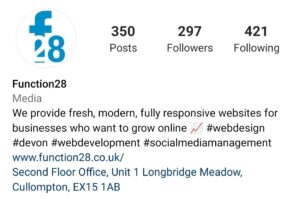
See BioWe’ll start with the real basics. Create your account, have a recognisable profile picture and in your Bio, you only have 125 characters to explain what you do so use it wisely!

You’ll have the option of turning your profile into a Professional Account under Settings. This gives you the tools to measure your success under your Profile Page.

2. Post Regularly

There is no right or a wrong number of how many times you should be posting to your Instagram account. Many marketing agencies, us included, recommend posting at least 2-3 times a week. You may find that some brands post several times a day – if you have the content and lots to say, do it!


3. Hashtags

Everyone has come across a hashtag in their time on social media and you may be wondering what that is all about! Hashtags are a great way for people to follow specific subjects that they are interested in. For example, ones Function28 follows on Instagram are, #SocialMediaManagement, #GraphicDesign. Putting hashtags in your post is a fantastic way of getting your company in front of more people, increasing engagement, and gaining followers.

There is no limit to how many hashtags you can use but try not to do too many. Anything from 5-11 hashtags will help organically boost your post. And try and keep the hashtags relevant to the post and your company, otherwise, you’ll be seen as a spam account!

Top Tip – put your hashtags are the first comment on your post. That way, it makes your post look a lot less “spammy”!


4. “See Bio”

This will be a phrase that you will see often in a company’s Instagram post and one that I have typed thousands of times! Instagram try and keep people on their platform for longer by not hyperlinking websites (I hate to sound cynical, but this is what it is at the end of the day!). The way around this is to put a relevant link, usually to your website, under your Bio.

If you need to change the link for example, to a blog post, it’s easy enough to keep changing it under your Profile, but you must remember to change it back! Because the character limit is short in this area, check out Bitly which reduces the size of the link, making it all neat and tidy.
Engage5. Engage, engage, engage

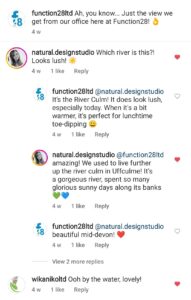
It’s so vitally important that you engage with any comments that are left on your post (negative or positive!), people can see that you as a brand care about your customers. Also, a great way of engaging with other brands is to reply or like their posts too.

Creating outbound awareness is a sure-fire way of gaining more followers and engaging more people. This does take time, it’s not something that happens overnight but it really does help build your brand.

6. Follow similar businesses and customers

This does take some time, but it is well worth it.

For example, if you are a florist, follow others and they will more than likely follow you back and engage with the content you’re putting out there.

Searching for relevant hashtags will help you find prospective followers who you can engage with and follow them. Some will follow you back, some won’t – don’t be disheartened if they don’t!

7. Create great content

ContentYou know who your target audience is, but you might be a little unsure as to what kind of content will make them engage with you.

Top Tip – there is absolutely nothing wrong with looking at what your competitors are doing and taking some inspiration from them. This is something I recommend to anyone coming to me who needs help with their social media.

The go-to content that so many businesses use are:

– A sneak peek of new products
– Inspirational quotes
– Employee selfies
– Pictures of your products
– Showing off the office dog always gets great engagement!

Give these a go and see what is the most popular.

8. Good quality images

Nothing gets my goat more than seeing bad photos! Instagram is so image reliant, it’s important you get this right. You don’t need to be Rankin to take a good photograph, here are some tips on getting a great photo:

– Use natural light – if you’re taking a photo outside, do it in the late afternoon when the lighting is best. If you’re indoors, make sure your blinds and curtains are open to let natural light into the room.
– Use the back camera – this will give you a higher-resolution photo
– Download photo editing apps – to give your photos the professional edge, download an app to help edit your pictures. For example, check out the free app, BeFunky.

There you have it – some great tips on getting the most out of Instagram for your business! Take a look at our blog from last week on How to… Facebook for business.

If you need help or advice when it comes to your social media pages, please contact Gemma on gemma@function28.co.uk.

Give us a follow and keep up to date with the latest goings on at Function28 on Facebook, Twitter, Instagram, and LinkedIn.


 

How to… Facebook for Business

Are you not sure what to write on your business Facebook page? It’s significantly different to posting on your personal profile and can sometimes leave people stumped!

Here at Function28, we want every company, big or small, to succeed in promoting their company on various social media platforms. We’ve put together a handy guide on what you should be doing on Facebook for your business.

1. Profile Picture
Let’s start with the very basics. On many occasions in my travels, have I seen companies NOT using their logo as their profile picture. If you would like customers and new followers to find you easily, use your logo or relavent imagery. When it comes to your Cover Photo, make it engaging. For example, if you have some professional photos of what your company can create, showcase them here.

2. Choose the right buttons
When you create your Facebook business page, you’ll be asked what Call-to-Action button you’d like to be featured at the top of your page. Think to yourself, what action would you like your customers to take? Would you like them to message you, call you, or visit your website?

3. About You
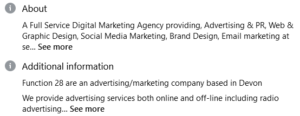
AboutWhen creating your Facebook Business profile, you should be filling in the About section. This area will tell potential followers more about what you do and they’ll get a feel for the page before they Like it.

4. Find your voice
When speaking to an acquaintance a few months ago, she was looking for social media help for her own business – I gave her one rule, “just be yourself!”. As a company, you will have a ‘voice’ that you’d like to get across to your followers. A lot of companies take a relaxed tone to their social media posts, it really of course, depends on your type of business.

Have an enthusiastic tone to your posts – no one wants to read something where the author doesn’t really care!

5. Content
Facebook is a great way to engage customers and followers using great content. You’re building your brand and talking to your customers directly, finding out what makes them tick and why they love your brand.

Your content should be 80% entertaining, engaging, and informative. 20% is reserved to talking about your product. People don’t want to have products shoved in their faces 24/7 on Facebook. You don’t want to be losing followers!

Posting your text with images is a must on Facebook. Your followers are more likely to retain the information in your post if there is an image to go alongside it.

Mix up your content with amusing gifs, quizzes, and competitions. Ask your customers questions. Followers love to get involved in conversations, and like it even more when you reply directly to them.

Make sure you know about all the holidays and event days. You can jump onto the relevent topics on these dates and engage more people – you can find a great calendar here.

6. Research
All businesses look at their competition to see what they are up to. When it comes to social media, what are their weaknesses/strong points. What would you do differently? What would you ‘borrow’?

Insights7. Post at the right times (and not too many times)
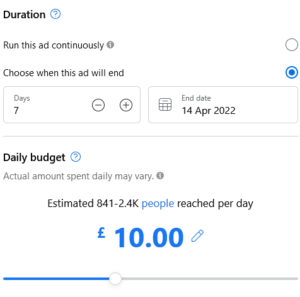
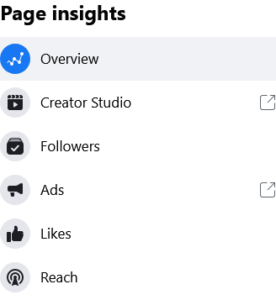
This does depend on your type of business but the general concesus is to post on early Friday morning, and Tuesday, between 6-9am. As time goes on and you post more, Facebook Insights is a really handy tool to know when most of your followers are online.  You’ll be able to find out when it’s a good time to post in order to get the best engagement.

When it comes to frequency, my rule of thumb is 3 days a week. Too little, less engagement, too much… well, less engagement!

8. C2A
All your posts should have a Call-to-Action. What would you like your followers to do? Go to your website, post in the comments, send you a message? Don’t leave them hanging!


9. Promote Your Page
When you first create your page, a great way of growing your page organically is to invite your friends and family to Like and Share the page. But if you’d like to reach out to a bigger audience, a paid ad is the route to go down.

AdYou can either promote a specific post, or promote your whole page with the view of gaining more followers, there are pletny of objectives you can choose from.

You can set your budget, timeframe, and audience type in the Facebook Ads section. It doesn’t take long to do at all.

10. Share News and Hot Topics
Brands on all platforms went to town over the hoo-ha at the Oscars this year! Jumping on to the latest news and hot topics will get you in front of more people and could gain you more followers. Ask what your followers think about the topic you’re posting about to get that engagement.


There you have it! 10 tips on how to use Facebook for your business.If you’d like a more in-depth conversation about social media, and how it can work for your business, please phone Gemma on 01884 308091, or drop her an email on gemma@function28.co.uk.

View our others blogs here.


Brand New Website from F28

We’re very proud to present to you a brand new website that we have created for Cockleshell Endeavour, which went live this weekend.

Cockleshell Endeavour team. Mick and Steve
Cockleshell Endeavour team. Mick and Steve with fellow veterans.

Cockleshell Endeavor is a project to support veterans through water-based adventures. The projects was founded by Mick Dawson and fellow Falklands veteran, Steve Sparkes in 2018. They’ve been doing fantastic work with war heroes throughout the UK ever since.

On April 2nd, to mark the 40th anniversary of the Falklands War, Mick and Steve started a 650-mile paddle. They started from the Commando Memorial at Spean Bridge, Scotland, and they hope to reach the Yomper statue at Southsea on June 14th, the date which marks the end of the war. They hope to do most of this by kayak. Along the way, they’ll be meeting with veterans to gather stories from those personally affected by the 1982 war.

cockleshell website
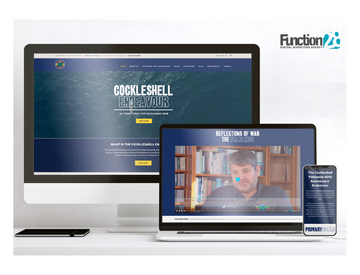
Cockleshell’s fully mobile responsive website.

Mick and Steve were after a fully responsive website to tell the world about the brilliant work they’ve been doing over the past 4 years, and to keep followers informed about the progress of their fundraising journey, through the website blog and newsletter.

The two are looking to expand the website over time, to keep followers up to date with activities and fundraisers they can be involved with.

We’re very proud here at Function28 to be supporting Mick and Steve at Cockleshell Endeavor on this amazing adventure and we wish them the very best!

If you are able to, you can donate on their website here, and follow them on Facebook to find out more about their charity and progress.

To find out more about our other website projects, please visit our Blog.

Keep up to date with everything going on here at Function28, follow us on Facebook, Instagram, Twitter, and LinkedIn.


Facebook Jobs coming to an end

This December, Facebook made the big announcement that the Facebook Jobs product will be coming to an end on the 22nd February 2022, with the exception of America and Canada.

What’s changing

According to Facebook’s official website:

  • Existing Facebook Groups with a “Jobs” group type will be changed to the “General” group type and the “Jobs” group type will no longer be available.
  • The ability to distribute free jobs via a partner integration with the Facebook Jobs API will no longer be available.
  • Facebook Jobs will no longer be available on the Facebook Lite app or Facebook mobile website for both employers and jobseekers.
  • The Facebook Jobs browser will no longer be available.
  • Facebook Jobs is shutting down outside the United States and Canada.

What does that mean for your business?

Obviously, this depends on the kind of business you run, for most, this won’t be too much of a change.

If you’re heavily reliant on Facebook Jobs, you’ll need to make sure your website is set up for any applications to go through here instead. You’ll also need to ensure that those applying by email, will be answered.

When it comes to advertising a new job on Facebook, you’ll need to create the job listing on your own business page, just like you’d do when creating a normal post. Key information such as job title, hours, wage, and how to apply must be made very clear. When it comes to advertising for the job outside your own business page, you’ll still have the option of sharing your post to local or relevant groups.

The upside of Facebook Jobs going

There are several reasons why some companies don’t like using the Jobs section of Facebook. It can attract bad candidates who don’t fully read the job description, and there is also a lot of competition meaning many ads are not seen due to everyone else advertising too.

Here at Function28, we believe this is a great opportunity to get creative with your job adverts and stand out from the crowd to attract the right kind of candidate for your company.

We believe that by advising through your own Facebook page, you’ll get a better level of the candidate, and they will no longer be trigger happy on that Apply button. Pointing them in the direction of your website to find out more, and by following the steps of applying, this will funnel out the timewasters, which in turn will save you lots of time sorting the wheat from the chaff!

For any questions about this blog or about your social media pages, please call us on 01884 308091 or info@function28.co.uk.