
The world’s most expensive vanity project or the protection of free speech?

TwitterOk, so things have calmed down enough for us to take stock about what the heck happened to Twitter last week!

On Monday 25th April, news broke that Twitter’s board of directors had accepted Elon Musk’s offer of $44 BILLION for control of the social media platform. The South African has apparently acquired Twitter to make sure the platform adheres more closely to the principles of free speech.

The board at Twitter at first resisted Musk’s offer, taking the ‘Poison Pill’ defence to shield themselves from a hostile takeover just days before they accepted his offer.

What has been the reaction to this, and why has Elon Musk bought Twitter? Let’s delve in…

The Reaction

Musk’s takeover of Twitter was met with a mixture of shock, fear, and humour by Twitter employee’s. The fact that Twitter is now protecting its source code from potential disgruntled employees kind of says it all. Remember when an employee on their last day closed down Donald Trump’s account? That’s one way to leave your job…

A number of celebrities have left Twitter because of the Musk takeover. They cite various reasons, namely because of opinions he’s shared on the platform ranging from politics to the use of pronouns.

There are those who don’t see the takover as a bad thing. Even the former CEO of Twitter, Jack Dorsey tweeted his support of Musk and his plans to transform it.

According to a recent poll, 58% of marketers aren’t worried. Musk has said that he will eliminate harmful bots by verifying accounts. Marketers like myself are happy that the Edit button might actually be on the horizon now.

Many express they are happy about the potential changes to the platform when it comes Musk’s campaign on free speech. Some think will help broaden the audience.

This leads us nicely on to the next topic of this takeover…

Free Speech

“Free speech is the bedrock of a functioning democracy, and Twitter is the digital town square where matters vital to the future of humanity are debated,”
Elon Musk

The other 42% of marketers from this poll are worried for about the future of Twitter. With Musk’s crusade on free speech (he describes himself as a “free speech absolutist”), some worry that the platform will be flooded with dubious consipiracy theorists and ‘alternative truthers’. They are concerned that the billionaire will “turn a blind eye to harassment, hate speech, disinformation and other vile expressions”. Potentially, this could turn off many big brands who no longer will want to be associated with Twitter.

Some people on the Right see Twitter as being more left-leaning compared to other platforms (this research shows otherwise), as a number of big names on the Right have been banned from Twitter, including a former president of the United States.  Maybe Trump et al will make a comeback now Musk is in charge?

Musk is well-known for blocking “haters” on Twitter when they tweet negative opinions about him, so how can this person really be for free speech?

Some journalists and business owners think it’s not about free speech at all. So what is it all for?

Other factors at play

Amazon founder, and second richest man in the world, Jeff Bezos shared his opinion on Twitter about Musk’s buyout:-
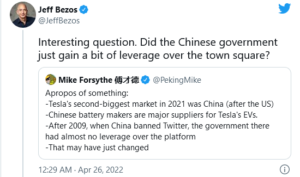
Could China now have an influence on Twitter now that Elon Musk has bought it? It’s certainly an interesting take on the whole thing and one that could absolutely lead this author down a rabbit hole! But I won’t get into this today…
I’ve seen a few jokes on Twitter about this being one of the most expensive mid-life crisis ever. It could well be, but of course, this isn’t the first big company that Musk has splurged out on.

We’ve also got to think about the actual character of the man. A word that is often bandied about is, ‘Narcissist’. Has Musk come to the conclusion that money can really buy you love? Searching through Twitter comments about this subject (aka, the cesspit), you will inevitably come across Elon Musk ‘Fanboys’ who idolise the man as some sort of saviour of the “Deplorables”. All the Likes, Retweets, Replies and Follows are just fuel to Musk. Why not buy a platform that makes him feel like King of the World?

The Future

My initial reaction to the news was, “another rich man spending money on things that he shoudn’t be”, followed by “hmm, it could work, Tesla is doing ok! Hey, an Edit button!” to, “I’ve got a really icky feeling about this”.

I’m on the side of the 42%. I worry about what this white, billionaire, middle-aged man can do to the future of free speech on social media.

The last thing we need right now is for someone of privilege to start polarizing the world even further by allowing the floodgates to open on hate speech, misogyny, and racism.

We’ve all seen what impact Rupert Murdoch has had on the world by purchasing multiple media outlets. I don’t see this as any different, Musk is now effectively a modern-day media tycoon with this purchase. We don’t need another Murdoch, that’s for sure.

Hey, I could be completely wrong and Musk will throw away his toy and move on to something new, and maybe help solve climate change with his billions…

To keep up to date with all the latest goings on in the digital world, please give us a follow on Facebook, Twitter, Instagram and LinkedIn.

Read our other blogs here.


How To… LinkedIn for Business

LinkedIn is bigger than you think… the numbers certainly took me by surprise when researching this blog! As of January 2022, the platform had 722 million users, with 55 million companies listed!

LinkedIn is a great platform to share content about a product, a business and keeping followers updated with all that is going on at the company.

But how do you make LinkedIn work for your business, especially B2B? We take a look in this blog.

(If you have already got a LinkedIn account, you might want to skip the first few points as we’re also focusing on setting up a business page.)

LinkedIn for Business1. Create an account for yourself

Lets start with the basics! In order to create a page for your company, you must first of all set up a profile for yourself. Preferably using your work email address, sign up and then create your business page, making yourself Admin.

When setting up your page, you will be asked what size your business is. You’ll then be asked to add a new profile picture. When doing this, make sure it is either your logo or something your followers will instantly recognise. Create a nice short tagline about your business and you’ve created your page!

2. The nitty gritty

Once you’ve completed the very basics of setting up your page, you can start filling in all the little details such as a banner image (see previous blog on Twitter about this), a Call-to-Action button (this can be Contact us, Learn more etc), fill in the details about your website and where you are based.

3. #’s

When setting up your page, you can choose which hashtags you’d like your business to be associated with. This will not only help reach more people when they are searching for that specific hashtag, but allows you to jump onto a trending topic as your company. All good ways of growing your following.

4. Invites

One of the best organic ways to build your page is to invite your Connections to Follow your page. This will be an option to the right of your page.

If you have employees, ask them to update their profiles to include the company page. When their connections visit their profile, they will be able to click the company name and it’ll take them through to the business page you have created. If they wish to follow, they have the option to do so when they visit.

5. Strategy

No one can set up any social media page without having a strategy in place, otherwise you’re just swimming against the tide.

What is the goal of having a LinkedIn page for your business?
What will you use your page for – maybe recruiting, generating leads, sharing industry news that doesn’t perform as well on other platforms?
How often will you be posting? (Top Tip – try and post every working day in order to build up your page).
What topics will you talk about?

Having a strategy in place will allow you and your staff members to use the platform more effectively.

6. Networking

Don’t forget that LinkedIn is a social network! Not only should you be posting regular content on your page, you should also be talking to other brands and individuals, just like on all social media platforms. This is  a sure-fire way of building your page as well as getting your brand’s name out there.

7. Blogging

LinkedIn is an excellent platform to share content to your target audience. Sharing blog posts (or writing Articles via your page) can further educate your followers about your product, which is the start of the customer journey.

Sharing engaging blogs will help drive traffic to your website, and hopefully turn some of those leads into paying customers.

8. Promote your page

We’re not talking about paid ads (hmm, new blog idea!), but how to grow your page organically. One way is to advertise your business is on LinkedIn via other platforms such as Facebook and/or Twitter. If you’re doing email marketing, share a link to your page in your next newsletter. Adding a LinkedIn button to your website is another good way of directing people to follow your page.

9. What is the competition up to?

If you’re really stuck on what you should be putting out there content-wise, check out your competition, what are they posting? How would you do things differently?

Some tips to get your business page set up on LinkedIn! Take a look at our other How To social media series on our Blog.

Follow us on Facebook, Twitter, Instagram, LinkedIn to keep up to date with all the latest trends on social media.

#OverIt – is the hashtag dead?

Hashtags first came into prominence 15 years ago with businesses finding them a great way to organise content and reach more people.

However, in the last few years, spam and bot accounts have hijacked hashtags, adding them to their posts that have no relevance to the subject, meaning anyone searching for that hashtag has numerous posts displayed in front of them that don’t make any sense.

A number of marketers believe that hashtags just don’t have the power they once had. Recently, even the Head of Instagram said they are pretty much a waste of time.

This begs the question, is the hashtag dead?

Many marketers still advocate the use of hashtags, as they have proof directly from the analytics showing they result in engagement.

Here at Function28, we don’t believe the hashtag is dead, you just need to use them wisely. Let’s get into this…

How many is too many?

Instagram has a 30 hashtag limit. You can by all means use all 30, but after 10 or so, they get diluted and too far away from the actual content.  Our advice is to use 7-10, this way you stay on subject.

Do your research

Before you post, find out what hashtags are used commonly within your industry. There are fancy-pants paid for sites (such as this one) that can help you with this, but all it takes is a little bit of your time. Search within Instagram keywords for your industry, e.g. #SocialMediaMarketing, and see how many posts there are with that hashtag. The rule is, if the hashtag has over 1m posts, stay away from using that one. Your post will only get lost in that feed and bring you very little in the way of followers or engagement.

Monitor what the competition is doing. What hashtags do they use? What posts worked best for them?


Keep it relevant

Whatever hashtags you do use, keep them relevant to the content you’re posting. There are some rules that you should always have in mind when you’re using hashtags:-

Description – for example, for a post advertising web design, use the hashtag, #webdesign

Location – if you’re posting about an event, maybe where you’re based, put in the location

Keep it short – too many words make it harder for people to read, and the likelihood of it being a popular one in the first place is very low.


Show your support

You’ll see many companies using hashtags as a way of promoting/supporting social issues, for example #IWD2022 was widely used amongst a variety of companies back in March for International Women’s Day. If there is a way of linking a trending social issue’s hashtag for your company and you want to show support, then this is a good way of getting you in front of a wider audience.

Is the hashtag dead? Nope! Keep using them but wisely, and you’ll see your engagement grow!

Want to keep up to date with all the latest marketing and social media advice? Follow us on Facebook, Twitter, Instagram, and LinkedIn.

Read our other blogs here.



How to… Twitter for business

Twitter for Business

Twitter is a fantastic platform for businesses to stay on top of the latest trends and connect with their audience.

Twitter is a little different from other social media platforms in that it is more “live” and is a good way to source information on the latest news and trends. Twitter might not be for everyone, but its likely your competition is on here so therefore definitely worth exploring to see if it is right for your business.

I’m writing this blog right after Elon Musk bought the platform, so the advice I’m about to give you might change soon, who knows!

FACT: Did you know that 60% of a brands followers on this platform are more likely to buy from the company?

1. Build your profile

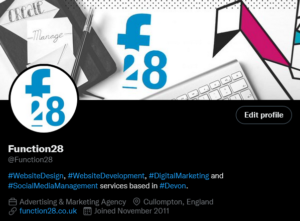
Make your profile stand out with great use of colours, logos, and a brilliant Bio.

If you leave your profile picture blank, it’ll just show an egg and will put a lot of people off from visiting your profile. Use your logo or an image that will be instantly recognisable to your customers.

Don’t forget to upload a banner too. This is where a lot of companies get creative and gives their customers more insight into their company.

Twitter will only allow 160 characters in your Bio so it’s a good idea to keep things brief and to the point. Using Hashtags in this area will help new followers and customers find you a lot more easily. If you have a website, put this on there too.

Your Twitter handle will need to be similar to your company name (i.e. @Function28) to make it easy for people to tag you. If your chosen handle is already taken, you’ll notice that some companies will put “HQ” at the end of their handle.

Switch your Twitter profile to Professional under Settings as this will help you when it comes to measuring your success.

Pinning a Tweet you’ve sent out (just like you can on Facebook) is the first bit of content anyone visiting your profile will see. You don’t have to do it, but it’s a great way of promoting a product, a sale, or a product launch.


2. Research

As with my other blogs, I have recommended that you check out the competition. Look at what kind of content they are sending out to their followers, is there anything you would do differently?


3. Entertain, engage, and have fun

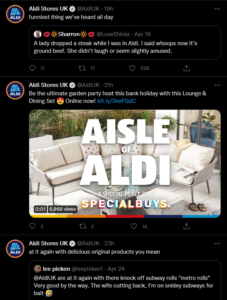
Some of you might well be aware of the Aldi’s amazing Twitter feed – if not, it’s worth checking out! They are on it when it comes to all the latest trends, interacting with their audience with retweets and replies, as well as posting entertaining content among their usual corporate tweets. They are one account I would recommend taking inspiration from.

Twitter, like all SM platforms, is there for you to engage and entertain your audience, it’s not all sales patter. 80% of your content should be there to educate, inform and entertain your audience, and 20% is to talk about your product. You only have a 280-character limit, so use it wisely!

If someone Tweets your company or replies to your post, try and engage with them. Positive or negative, it all helps build your company’s reputation. Positive interactions and tags are basically free marketing, so happy days!


4. Mix up your content

Tweets with images will get so much more engagement than those without. Gifs, images, and videos are a great way to bring attention to your profile.

Jump onto any trends you think will engage your audiences. i.e. a lot of businesses jumped on the Oscar’s fiasco with entertaining videos and posts.


5. Hashtags

Hashtags are an excellent way to get your content in front of more people.

When posting, stick to one or two relevant hashtags otherwise, you might be seen as a spam account.

Before you start using them, do some research first. See what hashtags your competition is using. Think about what words you’d like associated with your company, and see how popular that hashtag is by searching for it within the app.


6. Consistency is key

92% of companies Tweet more than once a day. Over-clogging your follower’s feed with just your content will turn them off so don’t Tweet too much! Once, twice, maybe even three times a day is a good number.

The best times to send a Tweet is in the morning, lunchtime, and early evening. These are when Twitter users are mostly online, and knowing when to post will help boost your engagement.


7. Schedule

We all live busy lives and social media is pretty much always low down on the list of priorities for a lot of businesses. If you have a few minutes to devote to your social media, you can schedule your Tweets to go out at a specific time and date. This feature can be found when you hit the Tweet button (the quill) and there is a little calendar symbol next to the Tweet button.

There you have it – some tips on gettings started on Twitter for your business.

Take a look at the other blogs in this How To series on our Blog area.

To keep up to date with everything Function28, follow us on Facebook, Twitter, LinkedIn, and Instagram.